
FocusReader
Save sourced web passages and export them as Markdown.
This Chrome extension opens articles in a quiet reader and saves selected passages with their source URL, title, date, and optional category. Quotes stay in Chrome storage and can be exported together as a Markdown file; it does not convert whole articles. The free tier holds 10 quotes, and a one-time PRO purchase unlocks unlimited local saves.
Product preview
See FocusReader in action
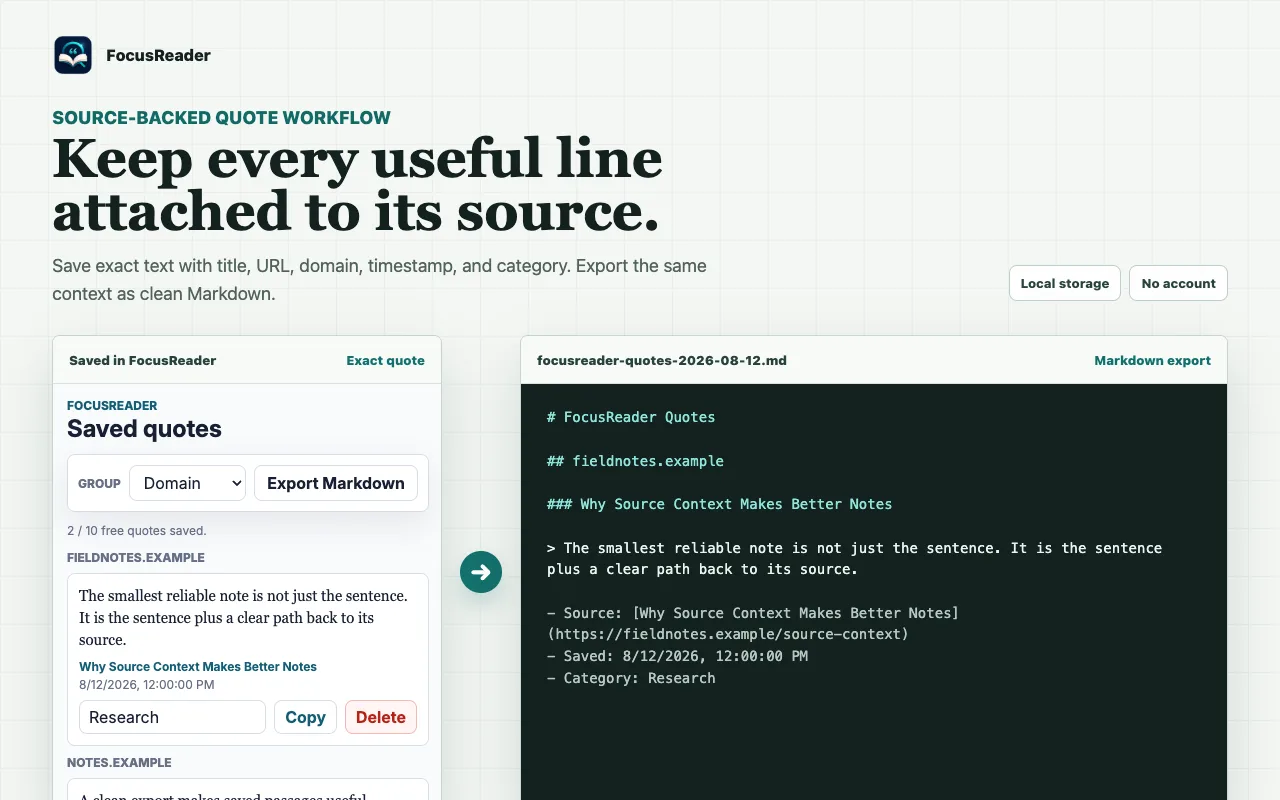
What is FocusReader best for?
FocusReader is a freemium Markdown tool best suited to writers and researchers collecting attributed passages in markdown. It is available as Browser extension on Web, and its source status is proprietary.
At a glance
- Pricing
- Freemium
- Source
- Proprietary
- Best for
- Writers and researchers collecting attributed passages in Markdown
Capabilities
- distraction-free article reading
- source-linked quote saving
- local quote library
- Markdown quote export
Platforms
Surfaces
Related tools
Markedly
Convert documents, spreadsheets, and images to Markdown on Mac.
Drop files or folders into a native macOS app to convert DOCX, PDF, RTF, HTML, spreadsheets, delimited data, and images into GitHub Flavored Markdown. Markedly works locally without uploads, accounts, or analytics and supports batch conversion, OCR, Finder Services, and Shortcuts automation.
Desktop app
macOS

Pandoc
The universal document converter.
Convert documents between Markdown, HTML, DOCX, EPUB, LaTeX, and many other formats from scripts or the command line. Templates, citation processing, and filters let you customize repeatable publishing workflows. PDF output requires a compatible external PDF engine; complex layouts may need format-specific adjustments.
CLI
macOS · Windows · Linux · CLI